
Safety & Custom Forms Software for Subcontractors | SubTrade
🛡️ Stay Compliant

Safety & Custom Forms

Build any form your job site needs — hazard assessments, inspection checklists, toolbox talks, material counts. Drag-and-drop builder with automations, QR public access, and two analytics dashboards.

23+
Element types
QR
Public access
2
Dashboards
Home / Forms Management
6
Deployed
🚀
0
With Approval
✍️
5
Public Access
🔗
0
Undeployed
📦
Quick Insights
100% of your forms are deployed to projects
5 forms have public access enabled
Folders
📁 All Forms
📁 Safety 4
📁 Office Admin 1
📁 Quality Control 0
📁 Material Count 0
Forms Library
📋 Presets 📊 Submissions + Create Form
Inspection Form HarnessesActive
Employee InformationOffice AdminActive
Boom Lift Pre-Shift ChecklistSafetyActive
Fall Protection InspectionSafetyActive
Scissor Lift InspectionSafetyActive
Field Level Hazard Assessment
Identify day-of-the-job hazards before starting work.
QR Code for This Project
● Active · Expires: Never
📋 Copy Link
🖨️ Print A4 Page
Expiry
Never 7 Days 30 Days 90 Days
FieldsStatic & Media
Tr Text
Select
Radio
Checkbox
Textarea
Email
📷 Photo Capture
# Number
📅 Date
🕐 Time
👍 Yes / No
✍️ Signature
👤 Contact Info
Predefined List
Static & Media
🖼️ Static Image
📝 Static Text
Tr Calculation
Divider
Container
2 Columns
📍 Location
☁️ Weather
👥 Attendees
INFORMATION
Static Image
Severity + Probability = Priority
1A
1B
1C
1D
2A
2B
2C
2D
3A
3B
3C
3D
4A
4B
4C
4D
Critical High Medium Low
STOP & THINK
What is the hazard priority?
1A 2B 3C 4D
≡ Describe the control measures taken...
PPE REQUIRED
Hard Hat
Safety Glasses
Fall Harness
Steel Toes
Hearing Protection
High-Vis Vest
📷 EVIDENCE & SIGN-OFF
📷 Tap to add photo
📷 Tap to add photo
✍️
Worker Signature
Required before submitting
✍️
Supervisor Approval
Workflow step 2
Pending
Field Settings
ConfigSettings
When "1A" → 1 email + Hazard
When value equals 1A
Create Action: Hazard
⚠️ Hazard will be created on the project
✉️ Send Email
Urgent Hazard Detected!
Attach PDF copy
RoleProject Manager
RoleAdmin
When "1B" → 1 email + Hazard
When value equals 1B
Create Action: Hazard
⚠️ Hazard will be created on the project
⚡ Drag-and-Drop Builder

Build Any Form — With Automations That Act for You

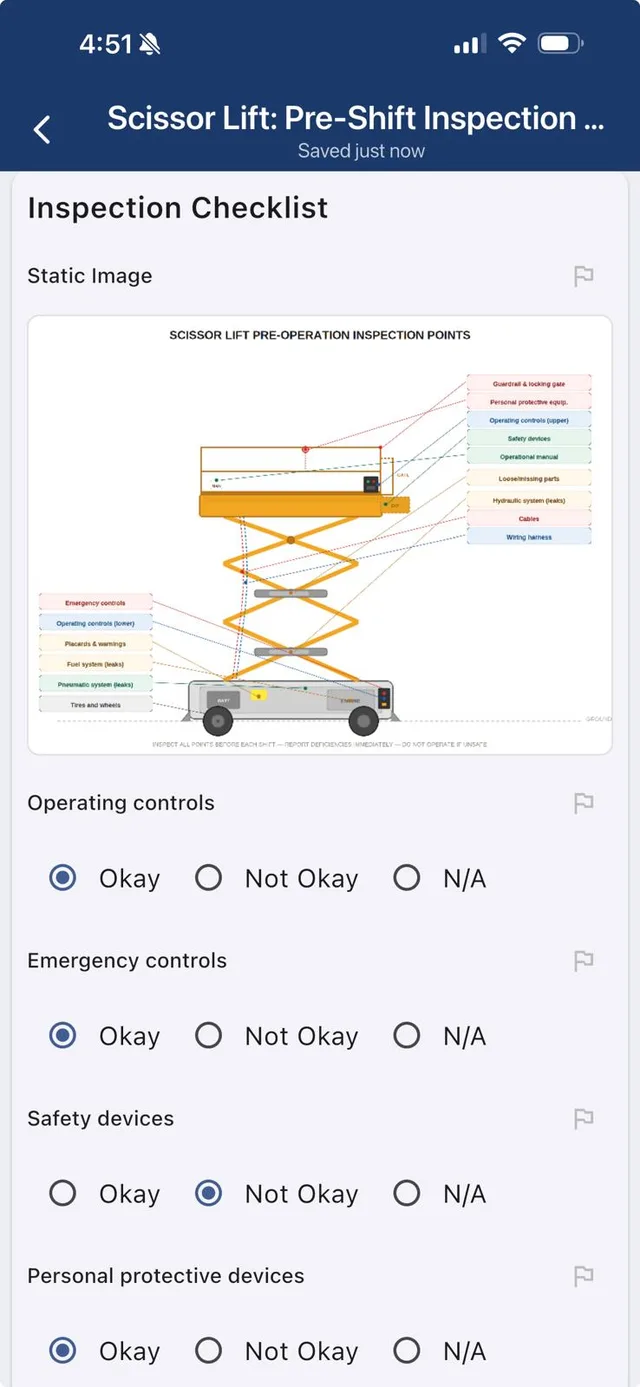
23+ element types across two tabs — 14 input fields (text, select, radio, checkbox, photo capture, signature, contact info, predefined list, and more) plus 9 static & media elements (static image, static text, calculation, divider, container, 2 columns, location, weather, attendees). Add static images like risk matrices or equipment diagrams that users can reference. Then wire up automations — if a crew member selects a critical hazard level, the system automatically creates a Hazard on the project, emails the PM and Admin with a PDF copy, and logs it for compliance.

  • 23+ drag-and-drop elements — 14 fields + 9 static & media
  • Conditional automations — "if this, then trigger that"
  • Auto-create Hazards on the project from form responses
  • Email notifications with PDF copy to role-based recipients
  • Static images for training, courses & risk matrices
  • Workflow signature approvals per form
Try It Free

Riverside Contracting Ltd
Summit Industrial Park · 319 8th Ave SW
Field Level Hazard Assessment
SITE INFORMATION
COMPANY NAME
WORK LOCATION:
DESCRIPTION OF JOB or TASK:
SUPERVISOR IN CHARGE: ▾
📅 Date: 2026/03/27
BASIC SAFETY
Do you have your PPE?
Are you working alone?
Safety Form
4°C
☁️ Overcast
Updated 2:19 PM
📍 85 Walgrove Rise SE, Calgary, AB
◎ Re-Detect Location
POTENTIAL HAZARDS
ENVIRONMENTAL
Work area clean
Material storage identified
Dust / Mist / Fumes
Noise in area
Extreme temperatures
Spill potential
📱 QR Code Public Access

Anyone Can Fill Out Your Forms — No App Required

Generate a QR code for any form and print it as an A4 page for your job site. Visitors, inspectors, sub-subs, and anyone on site scans the code on their phone and fills out the form — no SubTrade account needed. Set expiry to Never, 7 Days, 30 Days, or 90 Days. Forms auto-capture GPS location, weather conditions, and time stamp.

  • QR code + shareable link for any form
  • No app or account needed — public access via browser
  • Print A4 QR page for job site posting
  • Auto-capture GPS location & weather conditions
  • Configurable expiry: Never, 7, 30, or 90 days
  • Submissions tagged as Public vs Internal in analytics
Try It Free

Submissions Trend
Daily breakdown by type
Public Submissions Internal Submissions
Top Projects
By submission volume
RiversideSummitBridgeview
Submission Types
Public vs Internal
Public72% (18)
Internal28% (7)
Approval Status
Approved64% (16)
Pending20% (5)
No Approvals16% (4)
Top 5 Forms
📋
Field Level Hazard Assessment12
🦺
Boom Lift Pre-Shift Checklist5
🛡️
Fall Protection Inspection4
📊 Two Dashboards

Forms Dashboard + Submissions Dashboard

Two dedicated dashboards give you complete visibility. The Forms Management dashboard shows all your forms with stats (Total, Active, Deployed, Public Access, With Approval), folder organization, and Quick Insights. The Submissions dashboard tracks submission trends over time, Public vs Internal breakdown, approval status (Approved, Pending, No Approvals), top projects by volume, and top 5 forms — filter by user, project, form, or date range.

  • Forms Dashboard — stats, folders, insights, library
  • Submissions Dashboard — trends, types, approvals, top projects
  • Filter by user, project, form, or date range
  • Team activity tracking — top submitters & engagement
  • Organize forms into folders (Safety, Office Admin, Quality Control, etc.)
Try It Free

▶ See It In Action

Safety Forms, Built and Filled on a Phone

Watch how fast a crew builds a form, drops a QR code on site, and captures a signed hazard assessment from the field. No training, no paper, no chasing sign-offs.

  • Build a form with drag-and-drop in minutes
  • Post a QR code and let anyone fill it out on site
  • Capture signatures, photos, GPS, and weather automatically
  • Critical hazards trigger emails and create actions on the project
🚀 Start Free Trial

Common Safety & Forms Questions

📱

Can non-users fill out forms via QR code?

Yes. Generate a QR code for any form, print it for your job site. Anyone scans and fills it out on their phone — no SubTrade account needed. Set expiry to Never, 7, 30, or 90 days.

Can I build forms with conditional logic?

Yes. 23+ field types with drag-and-drop. Add automations — if a user selects a critical hazard, the system auto-creates a Hazard on the project and emails PM + Admin with a PDF copy.

✍️

Does it support signature approval workflows?

Yes. Add signature fields and configure multi-step approval workflows. Track approval status (Approved, Pending, No Approvals) across all submissions from the analytics dashboard.

🖼️

Can I add images that users can reference?

Yes. Add static images like risk matrices, equipment diagrams, or floor plans. Users view and reference them while filling out the form — perfect for training courses and safety orientations.

📊

What dashboards are included?

Two: Forms Management (all forms, stats, folders, insights) and Submissions (trend charts, Public vs Internal, approval status, top projects, top forms, team activity, advanced filtering).

💵

How much does SubTrade cost?

Free trial with no credit card required. Standard pricing starts at $299/month plus tiered per-user rates. Contact us for rates tailored to your team size.