

Drawings & Markups · SubTrade feature
The current set,
in every pocket
Building from a superseded drawing is one of the most expensive mistakes on any job. SubTrade puts the current set on every phone with markups, measurements and photo pins right on the sheet. When a revision lands, everyone has it instantly.
No credit card. Up and running in under 10 minutes.
On site
Drawings that work with gloves on
The full set on every phone and tablet, built for the field: pinch, zoom, measure and mark up right on the sheet. Your foreman stops calling to ask where the drawings are. They are in his pocket, and they are the right revision.
- Full drawing set on every phone and tablet
- Measure spans and take off areas right on the sheet
- Drop photo pins exactly where the issue is
- Markups, clouds and notes on the drawing
- Auto-named sheets on upload
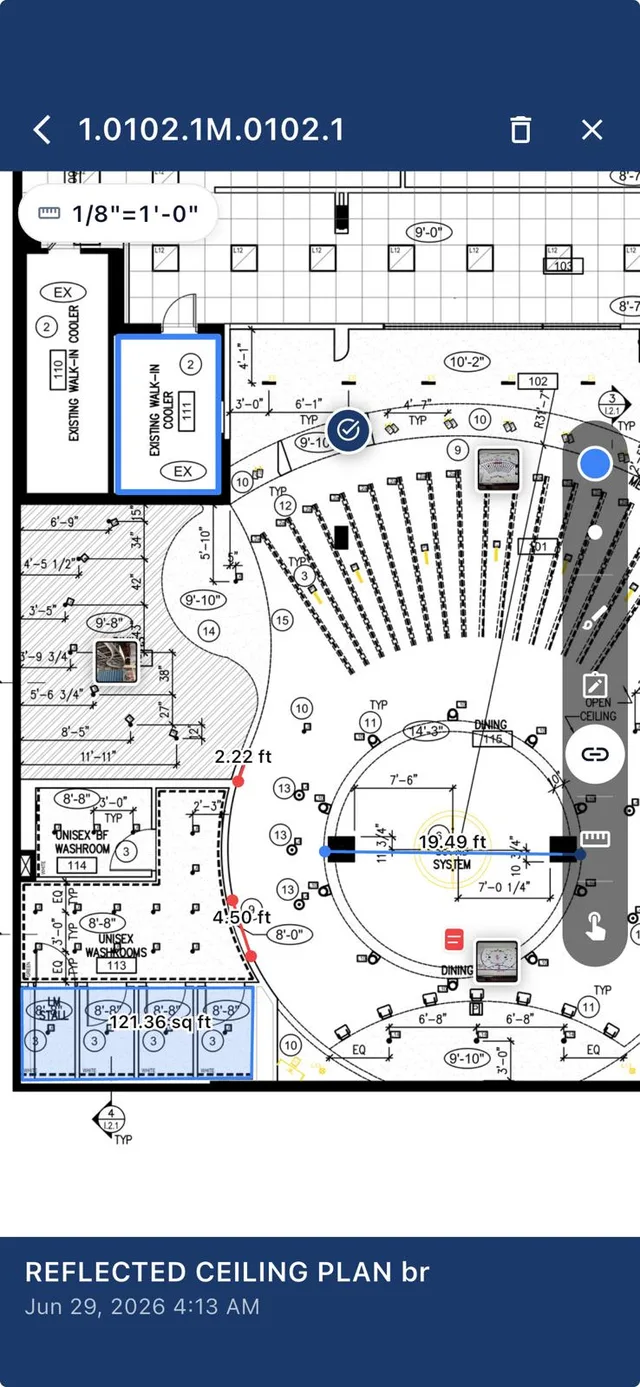
Precision
Measurements the whole crew can trust
Set the scale once and measure anything: spans, runs, areas. Layout questions get answered at the wall in seconds instead of back at the trailer, and takeoff checks happen on the spot.
- Scale-accurate measurements on any sheet
- Span and distance measuring in feet and inches
- Area takeoffs for quick quantity checks
- Photo pins tie site reality to the drawing
- Every markup saved as a layer, original untouched
Revision control
Revisions without casualties
Upload the new set and the old one is superseded everywhere at once. Every device shows the current revision, the old sheets are archived, not deleted, and nobody builds a wall from drawing rev B on a rev C job.
- New revisions push to every device instantly
- Superseded sheets archived with full history
- Markups carry forward where they still apply
- See which revision anyone is looking at
- The rev B wall never gets built
Common drawings & markups questions
Questions, answered straight
Can my crew see drawings on their phones?
Yes. The full current set works on every phone and tablet, iOS and Android, built for field conditions: pinch, zoom, measure and mark up on the sheet.
Can I measure on the drawings?
Yes. Set the scale and measure spans, runs and areas directly on the sheet, scale-accurate, in feet and inches.
What happens when a new revision comes in?
Upload it and every device updates instantly. Old sheets are superseded and archived with history, so nobody builds from an outdated drawing.
Can I put photos on a drawing?
Yes. Drop a photo pin exactly where the issue is, and the site photo lives on the sheet at that location.
Do markups change the original drawing?
No. Markups save as a layer on top. The original sheet stays untouched underneath.