
Change Orders · SubTrade feature
Get the extra signed
before you build it
Where subs bleed money: extras done on a handshake and fought over at month end. SubTrade lets your foreman create a professional change order on a phone in about a minute, attach photos, send it, and track approval, before the work happens.
No credit card. Up and running in under 10 minutes.
In the field
How change orders work on site
The GC asks for extra work. Instead of a handshake and a hope, your foreman opens SubTrade at the wall: scope, price, photos of the condition, send. The paper exists before the work does, which is the whole game.
- Create and price a change order from any phone
- Attach GPS-tagged photos of the condition as backup
- Send it for approval before the extra work starts
- Professional format the GC takes seriously
- No more remembering extras at billing time

Approval tracking
Every extra has a status, nothing gets forgotten
Sent is not approved, and approved is not invoiced. SubTrade keeps a live register of every change order and where it stands, so slow approvals get chased, rejections get re-scoped, and nothing quietly dies in a GC inbox.
- Live status on every CO: draft, sent, approved, rejected
- See how long each one has been waiting
- Photos and scope stay attached through the whole life of the CO
- The full history in one place when the dispute lands
- Chase the slow ones before they become free work
Into the draw
Approved extras become invoiced extras
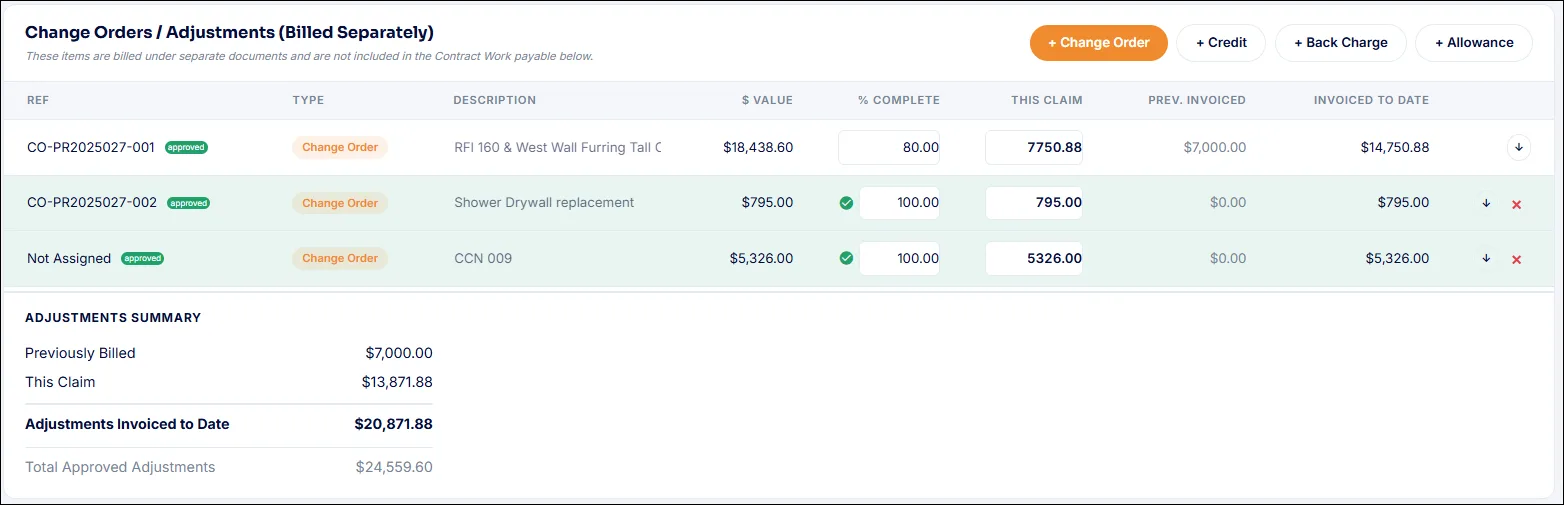
The change order you captured in the field carries straight into progress billing. Approved COs sit alongside your schedule of values, so when the draw goes out, every extra is on it, priced, documented and impossible to argue with.
- Approved change orders flow into progress billing
- Extras appear alongside the schedule of values
- Percent complete and claims backed by field records
- Holdback handled the Canadian way
- The month-end scramble stops existing
Common change orders questions
Questions, answered straight
How fast can I create a change order in the field?
About a minute. Open the project, describe the extra, price it, attach photos of the condition, and send. It is designed to be faster than the phone call it replaces.
Can I attach photos to a change order?
Yes. GPS-tagged, timestamped photos attach directly to the CO, documenting the condition that triggered the extra work. That backup travels with the change order permanently.
How does approval tracking work?
Every change order has a live status: draft, sent, approved or rejected, plus how long it has been waiting. You always know which extras are captured and which need chasing.
What happens after a change order is approved?
It carries into progress billing automatically. Approved COs appear alongside your schedule of values so every extra lands on the next draw, priced and documented.
What if the GC does not use SubTrade?
No problem. You send the change order to them directly from SubTrade, they do not need an account to receive, review or respond to it.
Does this work on my phone?
Yes. Change orders are built field-first: create, price, photograph and send from any phone, iOS or Android.
Video tutorials
See change orders in the app
Short walkthroughs from the SubTrade team, each with a PDF guide your office can keep.