

Crew Scheduling · SubTrade feature
Crews scheduled,
sites covered
Construction crew scheduling built for subs running many jobs at once: drag crews between projects, everyone gets notified automatically, and coverage gaps show up before they cost you a day.
No credit card. Up and running in under 10 minutes.
The board
The week, planned in minutes
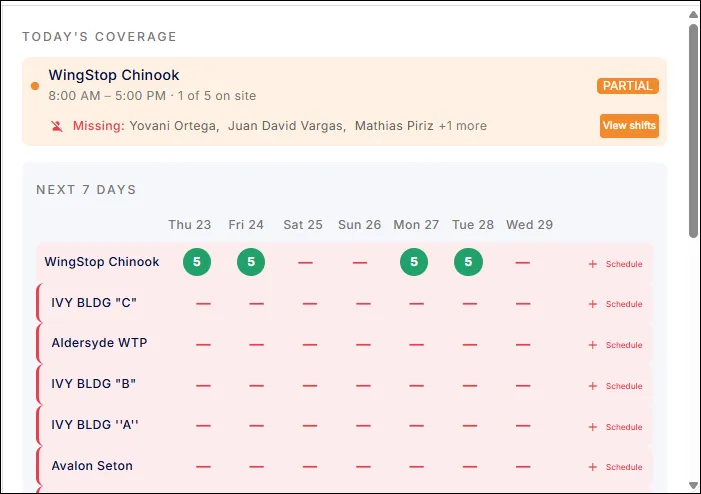
Every project and every day on one grid. Assign crews, spot the empty days, and fix partial coverage before it happens. When a site is not ready or an inspection slips, reassignment is a drag, not a phone tree.
- Every project and crew on one weekly grid
- Planned versus actual coverage, live
- Missing workers flagged by name
- Partial coverage warnings before they cost the day
- Empty days are one tap from scheduled
No phone tree
Everyone knows before they leave site
Change the schedule and the affected crew members are notified on their phones immediately. Nobody drives to the wrong site, nobody stands around Monday morning waiting for instructions, and the group text finally dies.
- Automatic notifications on every schedule change
- Crews see where they are going before they leave today’s site
- Reassignments take seconds, not an evening of calls
- Works across three jobs or fifteen
- iOS and Android, every crew member

Schedule meets timesheet
The schedule that checks itself
Scheduling connects to GPS clock-ins, so the plan and the reality meet every morning. Who was scheduled, who showed up, and where the hours actually went, without asking anyone.
- Scheduled crews matched against GPS clock-ins
- No-shows visible by 8 AM, not at lunch
- Hours land on the scheduled job automatically
- Real manpower history per project
- Feeds job costing without a single spreadsheet
Common crew scheduling questions
Questions, answered straight
How does crew scheduling work in SubTrade?
Every project and day sits on one grid. Assign crews by dragging, and the schedule shows planned versus actual coverage per site, with gaps and partial coverage flagged before they become lost days.
Do crews get notified when the schedule changes?
Yes, automatically. Any change notifies the affected crew members on their phones immediately, so everyone knows where they are going before they leave site.
Can I schedule across multiple projects?
That is exactly what it is built for. Subs running three to fifteen concurrent jobs see every project side by side and move crews between them in seconds.
How do I know if someone did not show up?
The schedule matches against GPS clock-ins, so planned versus actual coverage is live. A missing crew member is flagged by name in the morning, not discovered at noon.
Does scheduling connect to time tracking?
Yes. Clock-ins land against the scheduled job automatically, so hours, manpower history and job costing all flow from the same schedule.