How Subcontractor Software Streamlines Your Construction Projects for Enhanced Efficiency and Control
Construction projects involve managing numerous subcontractors, each with unique schedules, contracts, and compliance requirements. Subcontractor software centralizes these complex tasks, helping teams coordinate workflows, communicate effectively, and track progress in real time. Subtrade Software is widely used these days by contractors. This software reduces administrative burdens and improves project efficiency by automating processes and providing a single platform for collaboration.
By streamlining communication and consolidating data, subtrade software minimizes delays caused by miscommunication or missed deadlines. It also supports better financial oversight and risk management through transparent contract and payment tracking. Teams gain a clearer view of project status, allowing them to address challenges proactively.
Subtrade management tools integrate essential functions such as onboarding, scheduling, compliance, and reporting into one system. This enables construction professionals to focus on execution rather than paperwork, leading to smoother project delivery and more accurate outcomes.
What Is Subtrade Subcontractor Software?
Subtrade software is designed to improve communication, organization, and task management in construction projects involving multiple subcontractors. It centralizes key project information and automates routine processes to reduce delays and errors.

This type of software offers tools for contract management, compliance tracking, and real-time collaboration. Users can choose from various platforms based on their project size and complexity.
Core Features and Capabilities
Key features include document management, scheduling, and workflow automation. These tools help manage contracts, deadlines, and project milestones efficiently.
Compliance tracking ensures subcontractors meet safety and regulatory requirements. Payment processing features simplify invoicing and reduce administrative overhead.
Real-time communication tools allow project managers, subcontractors, and contractors to share updates instantly. Reporting and analytics provide insights into project performance and resource allocation.
Types of Solutions Available
There are cloud-based and desktop versions of subcontractor software, with cloud platforms becoming more common due to accessibility and scalability.
Some solutions focus on small subcontractor teams, offering basic task and document management. More advanced platforms target large projects, integrating budgeting, compliance, and field productivity tools.
Specialized software may cater to different trades or phases of construction. Providers often bundle features differently, so choosing the right fit depends on specific project and business needs.
Who Uses Subcontractor Software?
General contractors use it to coordinate multiple subcontractors and streamline project oversight. Project managers rely on it to schedule tasks and track compliance.
Subcontractors benefit by receiving timely updates, managing bids, and ensuring payment accuracy. Specialty contractors use the software to improve efficiency and customer relationships.
Owners and clients may access reports and progress updates, fostering transparency. Overall, the software supports various stakeholders involved in construction project delivery.
Who Uses Subcontractor Software?
Centralizing project management brings all critical functions into one accessible platform. This approach improves control over schedules, documents, and team interactions. It reduces delays and confusion by providing a single source of truth for project data.
1.Task Assignment and Scheduling
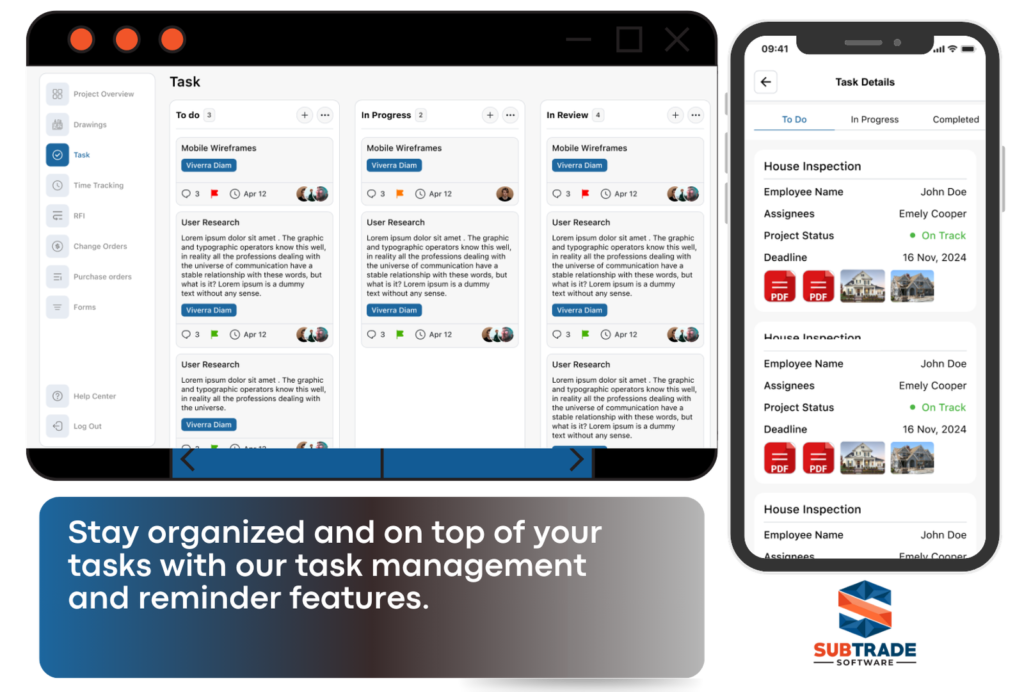
Subcontractor software enables precise task assignment by linking specific jobs to individual workers or teams. It allows managers to set clear deadlines and priorities, helping prevent overlaps and confusion.
Scheduling tools integrate calendars and resource availability, which reduces downtime and maximizes productivity. Alerts and reminders ensure subcontractors meet deadlines and adjust plans when delays occur.
This centralized scheduling facilitates quick updates, allowing managers to shift tasks in real time without disrupting workflows. It also helps track progress against timelines for better project forecasting.
2. Document and Drawing Management
The software centralizes storage for all project documents and drawings in cloud-based platforms. This ensures everyone accesses the most current versions to avoid costly mistakes from outdated information.
Version control features track changes and maintain an audit trail of edits or comments, enhancing transparency. It simplifies compliance by keeping all documentation organized and easy to retrieve during inspections.
Central storage also reduces paperwork and physical handling, improving security and reducing the risk of lost files. Subcontractors and managers can upload, share, and review documents at any time.

3. Real-Time Collaboration Tools
The software centralizes storage for all project documents and drawings in cloud-based platforms. This ensures everyone accesses the most current versions to avoid costly mistakes from outdated information.
Version control features track changes and maintain an audit trail of edits or comments, enhancing transparency. It simplifies compliance by keeping all documentation organized and easy to retrieve during inspections.
Central storage also reduces paperwork and physical handling, improving security and reducing the risk of lost files. Subcontractors and managers can upload, share, and review documents at any time.
Automating Administrative Processes
Subcontractor software reduces manual workloads by automating critical administrative tasks. It organizes key documents, manages contract lifecycles, and enforces compliance with industry standards and regulations efficiently.
Contract Generation and Tracking
The software automates contract creation using customizable templates, which speeds up the onboarding of subcontractors. This reduces errors and ensures consistency across all agreements.
Tracking contract statuses in real-time allows project managers to monitor approvals, renewals, and expirations without manual follow-up. Notifications for deadlines and changes keep all parties informed.
Automation also centralizes contract storage, making retrieval straightforward. This reduces paperwork and helps teams stay organized while improving transparency during audits or disputes.
Change Order Management
Managing change orders manually can lead to delays and miscommunication. The software streamlines this by automating the submission, approval, and tracking process.
Subcontractors submit change requests electronically, which are immediately routed to relevant parties for review. This speeds decision-making and reduces paperwork.
Automated logs keep detailed records of every change order, including cost impacts and timeline adjustments. This clarity minimizes disputes and ensures accurate project documentation.

Compliance and Documentation Automation
Subcontractor software automates compliance tracking by integrating regulatory requirements directly into workflows. This ensures subcontractors meet safety, licensing, and insurance standards before work begins.
Digital document management enables automatic collection, organization, and updating of required certificates and permits. Automated reminders alert project managers to upcoming expirations or missing documents.
By reducing manual oversight, the software decreases the risk of non-compliance penalties and project delays caused by incomplete documentation. This supports smoother project execution and audit readiness.
Improving Communication and Coordination
Effective communication and coordination in construction rely on timely updates, clear documentation, and transparent progress tracking. These elements reduce misunderstandings, enable quick decision-making, and keep all parties aligned throughout the project lifecycle.
Stakeholder Notifications
Subcontractor software automates notifications, ensuring all relevant stakeholders receive real-time updates on project changes, deadlines, and critical issues. This eliminates delays caused by missed emails or phone calls.
Users can customize notification settings by role, priority, or event type, which enhances focus and responsiveness. For example, safety alerts can be pushed immediately to site managers, while budget updates go to financial controllers.
This targeted dissemination of information improves accountability and keeps the entire project team synchronized without unnecessary message overload.
RFIs and Submittal Management
Request for Information (RFI) and submittal processes often slow down construction due to manual tracking and unclear communication channels. Dedicated software centralizes these workflows.
It allows subcontractors to submit RFIs digitally, attach drawings or documents, and track their status automatically. Similarly, submittals for materials or design approvals are stored and monitored in a shared platform.
This system reduces processing time, prevents lost documents, and provides transparent audit trails, which helps avoid rework and project delays.
Progress Reporting
Real-time progress reporting through subcontractor software consolidates input from multiple teams into clear, consistent updates. Daily logs, completed tasks, and photos can be uploaded directly from the field.
Managers and stakeholders get instant access to accurate data without waiting for manual reports. Dashboards display critical metrics such as milestones achieved, remaining work, and potential bottlenecks.
This visibility supports proactive management decisions, helping keep the project on schedule and within budget.
Enhancing Field and Office Connectivity
Effective communication between the field and office is essential for accurate project tracking and timely decision-making. Real-time data exchange and easy problem reporting help reduce delays and maintain project schedules.
Mobile Access for Field Teams
Subcontractor software provides mobile access, allowing field teams to update tasks, review plans, and report progress directly from job sites. This immediate access eliminates the need for paper forms and manual data entry later.
With smartphones and tablets, field personnel can capture photos, input data, and receive notifications on schedule changes. This accessibility ensures everyone is aligned with project timelines and requirements at all times.
Mobile access also supports offline work, syncing information once a connection is re-established. This flexibility helps maintain productivity in areas with limited internet coverage.
Data Synchronization
Data synchronization connects field inputs with office databases in real time or near real time. This continuous syncing ensures that project managers have up-to-date information on resource use, labor hours, and material inventories.
Automated updates reduce errors caused by manual reporting, keeping records accurate and consistent. Teams can compare planned versus actual progress, enhancing project forecasting and cost control.
Centralized data storage allows multiple stakeholders to access the same information simultaneously, improving collaboration and minimizing misunderstandings.
On-Site Issue Tracking
Subcontractor software includes tools for identifying and tracking issues as they arise on-site. Teams can log safety concerns, equipment malfunctions, or supply shortages immediately.
These reports are instantly communicated to office personnel, enabling quick responses and resolution plans. This process helps prevent small problems from escalating into costly delays.
Issue tracking often includes status updates, responsible parties, and resolution deadlines. This transparency promotes accountability and keeps project workflows efficient.
Boosting Project Efficiency and Accuracy
Subcontractor software improves the precision of project data and accelerates routine tasks. It minimizes risks related to human error while enabling faster decision-making through clearer processes and better communication.
Reducing Manual Errors
Manual data entry often leads to costly mistakes in construction projects. Subcontractor software automates processes such as time tracking, invoicing, and documentation, significantly lowering the chance of errors.
Automation ensures consistent data capture and reduces discrepancies in project records. This leads to more accurate cost estimates and reliable schedules—both critical for maintaining profit margins.
Software platforms can also validate inputs in real-time, flagging inconsistencies immediately. This early error detection prevents delays caused by rework or disputes, improving overall project accuracy and saving time.
Streamlining Workflow Approvals
Workflow approvals can slow down construction projects when reliant on manual or paper-based methods. Subcontractor software centralizes approval processes, giving stakeholders quick access to necessary documents and updates.
Automated routing of approvals reduces bottlenecks by notifying the right personnel at the right time. It tracks progress transparently, ensuring no steps are overlooked.
Key features often include digital signatures, status tracking, and audit trails, which improve accountability. This streamlining accelerates project milestones and allows teams to focus on critical construction activities rather than administrative delays.
Facilitating Informed Decision-Making
Subcontractor software centralizes project data and provides tools that allow construction managers to quickly understand the status and challenges of their projects. This enables timely adjustments and more effective resource allocation.
Analytics and Reporting Tools
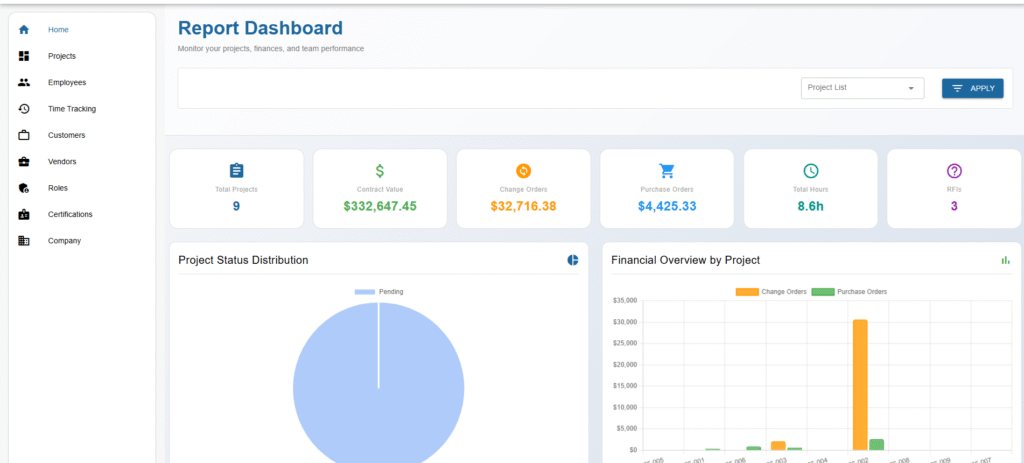
Analytics and reporting tools in subcontractor software consolidate data from multiple sources into clear, actionable reports. These tools allow managers to track key metrics such as project costs, timelines, and compliance status.
By using customizable dashboards and automated reports, decision-makers can identify trends and potential risks early. This reduces guesswork by providing data-driven insights on subcontractor performance and project progress.
Reports can be exported or shared easily, supporting communication with stakeholders. This streamlines status updates and supports transparent dialogues during project reviews.
Real-Time Performance Insights
Real-time performance insights offer up-to-the-minute information on subcontractor activities and project milestones. This information helps avoid delays by highlighting issues as they arise.
Subcontractor management platforms with live updates enable quicker responses to changes or disruptions. For example, schedule adjustments or budget overruns can be addressed immediately.
Real-time data also supports collaboration across teams by ensuring everyone works from the same current information. This reduces mistakes caused by outdated or incomplete information.
These features improve overall project control and contribute to meeting deadlines efficiently.
Choosing the Right Subcontractor Software
Selecting subcontractor software requires careful attention to features that boost efficiency, simplify workflows, and support seamless collaboration. It also involves ensuring the software can fit into current systems without causing disruption. Lastly, proper training and reliable support are critical to maximizing the software’s value on the job site.
Key Evaluation Criteria
The software should offer robust project management tools such as scheduling, task tracking, and resource allocation. Real-time updates and automated alerts help keep teams aligned. Ease of use is vital to encourage adoption among subcontractors who may have varying technical skills.
Security features must protect sensitive project and financial data. Reporting capabilities should provide clear insights into project status and subcontractor performance. Cost-effectiveness matters, but choosing a solution based solely on price risks missing essential functionality.
Integration With Existing Systems
Software that integrates smoothly with existing platforms like accounting, procurement, or enterprise resource planning (ERP) reduces duplication and errors. Compatibility with common file formats and mobile devices is important for field accessibility.
Automated data syncing between systems saves time by eliminating manual entry. A unified communication hub that connects subcontractors, general contractors, and clients fosters transparency. Without tight integration, fragmented data may delay decisions and increase administrative workload.
User Training and Support
- Comprehensive onboarding ensures subcontractors understand how to use the software effectively.
- Training should cover core features relevant to different roles and workflows.
- Options for self-paced tutorials, live demos, or in-person sessions cater to varied learning preferences.
- Ongoing technical support is necessary to resolve issues promptly and minimize downtime. Access to documentation, FAQs, and responsive customer service builds user confidence and aids adoption.
- Regular software updates with clear communication also help maintain system performance.
Frequently Asked Questions
- How does Subtrade Software specifically help subcontractors improve project efficiency?
Subtrade Software streamlines your construction projects by centralizing all project data, including daily logs, schedules, and documents, in one secure platform. With features like real-time collaboration, mobile access, and automated workflows, subcontractors can save an average of 15 hours per week, reduce errors, and boost productivity by 25%, ensuring projects stay on schedule and within budget.
- Can Subtrade Software be used on mobile devices for field teams?
Yes! Subtrade Software offers mobile applications for smartphones and tablets, allowing your field team to access plans, tasks, and documents anytime, anywhere. With offline capabilities and real-time updates, your crew stays connected and productive, even in areas with limited connectivity.
- What types of subcontractors can benefit from Subtrade Software?
Subtrade Software is tailored for a wide range of specialty contractors, including Electrical, Plumbing, HVAC, Concrete, Masonry, Drywall, Painting, Roofing, Flooring, and more. Unlike generic solutions, it’s designed to meet the unique workflows and billing needs of trade contractors, ensuring your business thrives.
- How does Subtrade Software help with profitability and managing change orders?
Subtrade Software helps you maximize profitability by simplifying change order creation, tracking, and management, ensuring you never miss a revenue opportunity. Its time tracking and job costing tools also provide accurate insights into labor costs, helping you optimize resources and improve project profitability.
- What kind of support and onboarding does Subtrade Software provide to new users?
Subtrade Software offers a seamless onboarding process, including personalized training sessions, online tutorials, and ongoing support via phone, email, and chat. Implementation typically takes 1-4 weeks, depending on your needs, and our team provides regular webinars and resources to ensure your success with the platform.
Ready to streamline your construction projects and boost efficiency?
Visit https://subtradesoftware.com/ to learn more and start your free trial today!
Streamline your projects, boost profitability, and connect your field and office teams
Construction Management Software Built Specifically for Subcontractors Like You.
BUILT BY
SUBCONTRACTORS
FOR
SUBCONTRACTORS
- Get your free trial
- No credit card required.